
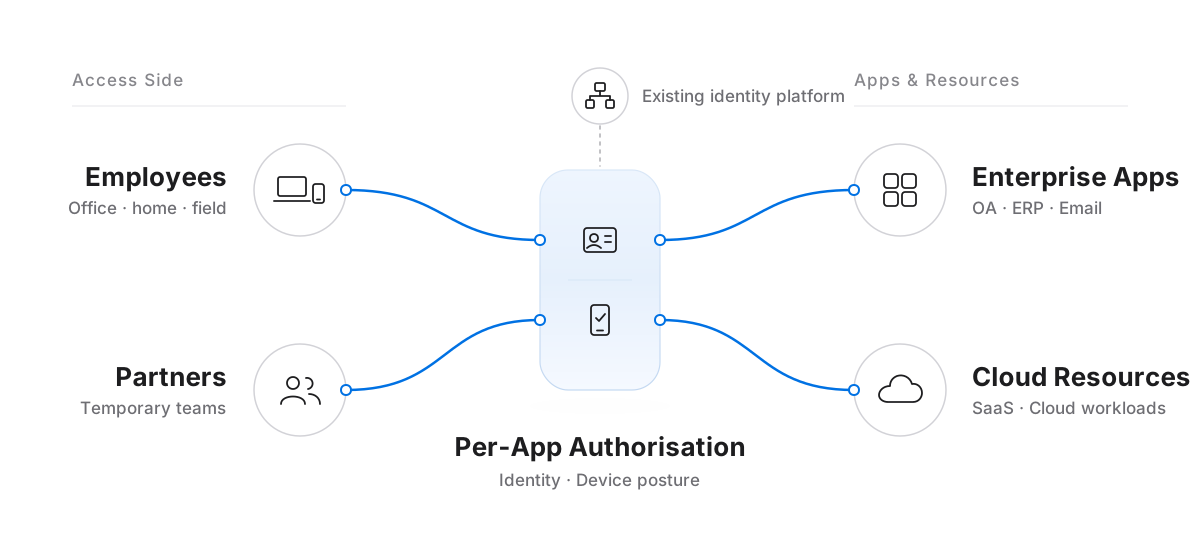
Open Only What Each Role Needs
Whether employees are travelling, suppliers are collaborating, or project members are joining, assign access permissions based on actual work needs.
| Who Needs Access | What Resources Are Opened | When Permissions Change |
|---|---|---|
| Employees and remote teams | Role-required enterprise applications | Updated when roles change or employees offboard |
| Partners and suppliers | Designated applications for collaboration | Adjusted when collaboration scope changes |
| Short-term project members | Project-specific resources | Revoked when the project ends or access expires |
Work from Anywhere with Less Access Friction
Combine your existing enterprise accounts and device management to apply consistent access rules across the office, home, and field locations.

Use Existing Enterprise Accounts
Integrate with your existing identity platform to grant access by employee identity without maintaining a separate set of accounts.

Check Device Posture Before Access
Work with your existing device management tools to verify endpoints meet enterprise requirements before opening access by policy.

Open Only What Work Requires
Scope permissions to specific applications so external collaborators can complete their work without exposing the entire internal network.

Keep Permissions Aligned with Personnel Changes
Centrally update or revoke access during onboarding, role changes, offboarding, or project completion to prevent lingering permissions.
Who Needs to Keep Working Outside the Office?
Tell us which applications your remote employees and partners need, along with how you currently manage accounts and devices, so we can plan how access is granted and revoked.